
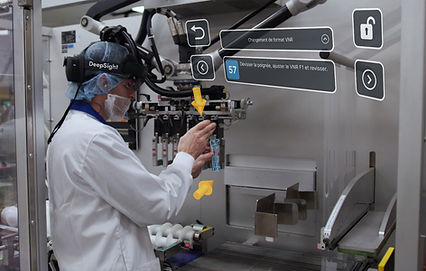
AR / AI PROCEDURE & LEARNING PATH CREATION
Augmented Reality (AR) and Artificial Intelligence (AI) harnessed to rapidly produce procedures and learning paths.
Rapidly develop and implement custom training processes and use training data to identify and follow specific learning paths.
AR / AI PROCEDURE & LEARNING PATH CREATION
- HOW IT WORKS -
Step 1: Create in the Studio
Build, edit and export training
Create easy-to-update holographic guides, documentation and evaluation inside the DeepSight Studio – Simply drag and drop!
-
Import
Add your digital twins (3D Scans or CAD models) to replicate your environment.
-
Design
Position your virtual elements easily including objects, photos and videos.
-
Detail
Add annotations, tools, or indicators at certain steps of your sequence to facilitate understanding.
-
Anchor
Add virtual anchors (QR Codes) to position your content precisely in your environment.
-
View
See your augmented procedures in the Holo native app (Hololens, iPad, iPhone, Apple Vision Pro).

Step 2: Train with AR Glasses or Tablets
Give and receive expert support anywhere, at any time
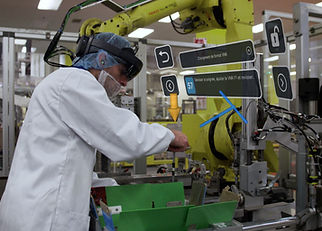
Watch and interact with trainings, capture data, record video, and share what you see with remote experts using smart glasses (Hololens or Apple Vision Pro) or mobile devices (iPad/iPhone).
-
Load
Scan anchors (QR Code) to see your augmented content precisely in your environment.
-
Step-by-Step
Follow each step to complete your instruction, maintenance or training guide.
-
Connect
Share what you are seeing to remote experts for instant support or troubleshooting.
-
Capture
Record performance indicators and allow users to take videos for visual feedback on unplanned issues.
-
Analyze
Review the data captured in Console (time spent at each step, competency matrix, etc.).

Step 3: Analyze your Performance Dashboard
Optimize with your performance dashboard
Access your performance data through the DeepSight Console and export it to your software of choice. Manage your team’s competencies to improve their skills.
-
Track
Access the data captured by workers and monitor their performance.
-
Breakdown
Segment your datasets based on specific workers, timeframes, procedures and even steps within procedures.
-
Evaluate
Generate graphics and tables to convert data into valuable information for your organization.
-
Export
Download a CSV file to process your data in any advanced analytics tool.
-
Optimize
Revise your processes in DS Studio.

THE EnSpire™ DIFFERENCE
EnSpire™ Excellence: Driving Operational Efficiency and Lasting Positive Change.
Transform your company's productivity through strategic analysis, structured training, and intelligent skills management.
Audit Process - Organizational Development Strategies - Skills Management Approach
(2-5 Day Process)
Benefits:
-
Increased Productivity (By evaluating and improving current processes.)
-
Targeted Training ROI (Through customized training plans tailored to employee needs.)
-
Stable Operations (By strategically distributing skills across your organization.)
-
Clear Strategic Alignment (Facilitated through dedicated strategic planning.)
Ready to Begin Making Positive Changes in Your Company?
Contact Nicole Peter, Director of Operational Excellence
to get your Audit Process started today!
(800) 942-2886, (262) 910-1376
PARTNERS IN CHANGE


